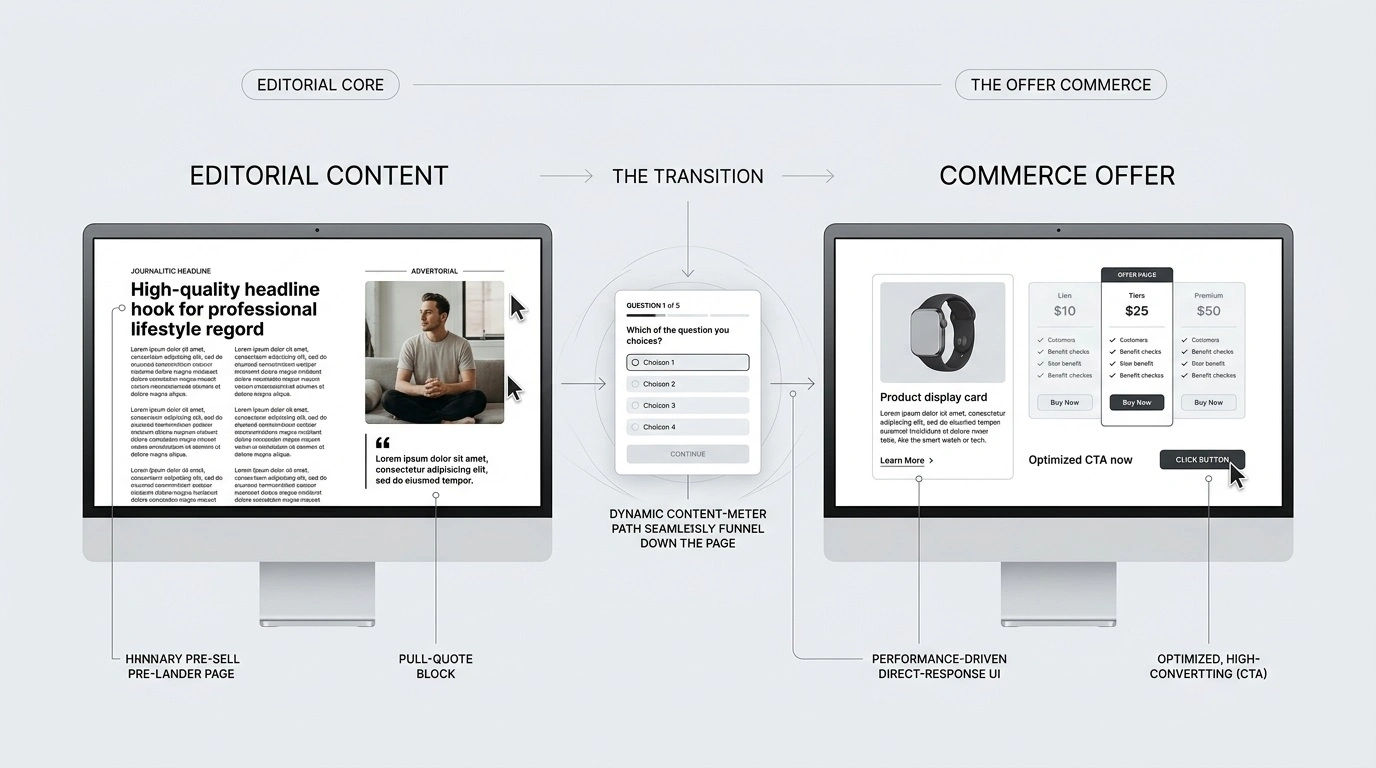
Pre-Sell Page Examples: Structure and Testing for Native Ads
A native ad can earn the click and still leave the visitor unsure what to do next. The offer may need context, a comparison, or an answer to one important objection before the visitor is ready to evaluate it. A pre-sell page can provide that missing step—but only when it answers a real question rather than adding another page to the journey.
This guide focuses on the practical decisions: which pre-sell format fits the offer, what each section should accomplish, how to connect the page to the ad and offer, and how to test whether the extra step is helping. The examples below are illustrative frameworks, not reports of real campaigns or measured results.
What Is a Pre-Sell Page?
A pre-sell page sits between an ad or content recommendation and the main offer. Its job is to prepare the visitor for the next step by answering a relevant question, explaining a product category, comparing options, or helping the visitor assess fit.
An advertorial is one possible pre-sell format, usually built around an article-like explanation that promotes an offer. Other formats include a comparison guide, a short educational explainer, a quiz or guided selector, and a video-led page. The format should follow the visitor’s information need—not a belief that one layout always converts better.
Pre-sell page vs. advertorial vs. product page
| Page type | Main job | Use it when | Watch for |
|---|---|---|---|
| Pre-sell page | Resolve a question or objection before the offer | The visitor needs context to judge relevance | An unnecessary extra step |
| Advertorial | Explain and persuade through article-style content | The subject needs a narrative, education, or detailed explanation | Implying independent editorial coverage when the content is promotional |
| Product or sales page | Present the offer and support the conversion decision | The visitor is ready to compare details or act | Repeating information already covered upstream |
These labels can overlap in practice. Judge a page by its primary job in the journey, not by its name.
3 Pre-Sell Page Examples You Can Adapt
Choose a format based on the question the visitor needs answered. Each example below shows a possible structure and the reasoning behind it; the copy and product details are placeholders, not claims about a real offer.
Example 1: Problem-and-solution explainer
Best fit: An unfamiliar product or method that requires a short explanation before the visitor can judge whether it is relevant.
- Headline: State the specific problem or question promised in the ad.
- Context: Explain why the problem occurs, without exaggerating its severity.
- Options: Describe the main approaches and the trade-offs a buyer should understand.
- Product role: Explain where the promoted offer fits and where it may not be suitable.
- Next step: Link to the offer with a label that accurately describes what the visitor will see next.
Illustrative example: An ad asks why a home-office webcam looks poor in low light. The pre-sell explains lighting, camera placement, and device limitations before presenting a webcam as one possible solution. It should not pretend the product alone fixes every setup.
Example 2: Comparison guide
Best fit: Visitors who understand the category but need help choosing among approaches or product types.
- Define the decision criteria before presenting products.
- Compare the available options using the same criteria.
- Explain meaningful trade-offs, including who may prefer each option.
- Disclose any commercial relationship that could affect how the comparison is interpreted.
- Send the visitor to the most relevant product or offer page, not automatically to the most expensive option.
Illustrative example: A guide compares three types of standing desks by footprint, adjustability, and intended workspace. The promoted desk appears in the comparison, but the page does not invent test results or call the comparison independent if it is not.
Example 3: Quiz or guided selector
Best fit: A category where the right choice depends on a few meaningful visitor requirements.
- Ask only questions that change the recommendation.
- Explain why the answers matter and avoid collecting unnecessary personal information.
- Show the basis for the recommendation, including relevant limitations.
- Let the visitor review the result before continuing to the offer.
Illustrative example: A software page asks about team size, current workflow, and required integrations. It recommends a suitable plan only if the answers support that recommendation. If the product is not a fit, the page should say so rather than forcing every visitor toward the same CTA.
How to Structure a Pre-Sell Page
There is no mandatory word count or universal template. Build the shortest page that resolves the main uncertainty and prepares the visitor for the next decision.
1. Match the ad’s promise
The headline and opening screen should continue the topic, language, and expectation established by the ad. If the ad promises a comparison, deliver a comparison. If it raises a specific question, address that question before shifting into product promotion. Curiosity is not a reason to hide the offer or change the subject after the click.
2. Give the reader the missing context
Identify the single biggest question that could prevent a reasonable next step. It might be how the product works, how options differ, whether the product suits a particular use case, or what trade-offs the visitor should consider. Organize the page around that question rather than adding generic benefits.
3. Support claims and show limitations
Use evidence that matches the claim: product documentation for specifications, a transparent method for comparisons, and genuine substantiation for performance claims. Distinguish facts from opinions. Do not present illustrative copy as a real testimonial, test, or customer result.
4. Make the commercial relationship clear
An article-like design should not mislead visitors into thinking paid promotional content is independent journalism. Clearly identify advertising or affiliate relationships where applicable, and review the current policies and legal requirements relevant to the campaign and market.
5. Make the handoff predictable
The CTA should tell visitors what happens next: view product details, compare plans, check availability, or continue to the offer. The destination should fulfil that expectation and should not force readers to repeat the same information without a reason.
A Worked Example: From Ad Promise to Measurement
The following is a hypothetical planning example—not a real campaign, case study, or performance claim. It shows how to connect the page to a testable business question.
| Element | Example decision |
|---|---|
| Ad promise | “Compare three ways to organize a small home office.” |
| Visitor’s likely question | Which option fits a limited workspace and budget? |
| Pre-sell format | A comparison guide with consistent criteria and clear trade-offs. |
| Required content | Space needs, setup considerations, key limitations, and who each option suits. |
| CTA | “View the dimensions and details” linking to the matching product page. |
| Primary test question | Does the comparison route produce more completed purchases per eligible visitor than the direct route? |
| Guardrails | Track page load errors, offer-page visits, refunds or cancellations where available, and spend. |
The point is not to assume the pre-sell will win. The point is to define what the page contributes and decide in advance how its contribution will be evaluated.
When a Pre-Sell Page May Not Be Worth Adding
Do not add a pre-sell page by default. A direct product or offer page may be the better route when the visitor already understands the product, the ad accurately describes the offer, the decision is straightforward, and the destination answers the remaining questions.
A pre-sell page is more defensible when it resolves a meaningful information gap, compares options fairly, explains a complex product, or helps qualify visitors before a higher-consideration decision. If it repeats the ad, delays access to essential details, or exists only to make the funnel longer, remove it or simplify it.
How to Test a Pre-Sell Page Properly
Compare the pre-sell route with a reasonable alternative, such as sending eligible traffic directly to the offer. Keep the comparison as controlled as practical: use the same audience, offer, attribution rules, and test period, and avoid changing several major variables at once.
| Metric | What it helps answer | Common misreading |
|---|---|---|
| Pre-sell-to-offer click rate | Does the page persuade relevant visitors to continue? | A high rate alone does not prove more purchases or profit. |
| Purchase conversion rate | What share of eligible visitors complete the target purchase? | Comparisons can mislead if attribution or visitor groups differ. |
| Cost per acquisition (CPA) | How much does each attributed acquisition cost? | It must be compared with contribution margin and the same attribution window. |
| Return on ad spend (ROAS) | How much attributed revenue is generated per unit of ad spend? | Revenue is not profit; costs outside ad spend may matter. |
| Page errors and load performance | Are technical issues preventing visitors from using the page? | A speed score alone does not explain the full conversion result. |
Before launching: define the primary conversion, confirm tracking on both routes, choose a decision rule, and allow enough data to distinguish a meaningful pattern from normal variation. Do not declare a winner based on a handful of clicks. If traffic or conversions are too limited for a reliable comparison, record the result as inconclusive rather than manufacturing certainty.
A simple test plan
- Hypothesis: State what the pre-sell page is expected to improve and why.
- Primary outcome: Choose one business metric, usually completed conversions or CPA, based on the campaign goal.
- Supporting metrics: Use offer click rate and engagement to explain the result, not to replace the business outcome.
- Controls: Keep the offer, audience, tracking, and attribution approach consistent where possible.
- Decision: Keep, revise, or remove the pre-sell based on the pre-agreed rule and the quality of the evidence.
Native Ad Policy and Transparency Checks
Passing an ad review cannot be guaranteed by a particular page format or writing style. Review the current rules of the network you use and the requirements that apply to the offer and target market. A page should be accurate, functional, consistent with the ad, and transparent about its commercial purpose.
- Taboola landing page policies: check the current requirements before launch.
- Outbrain advertising guidelines: review the rules relevant to your campaign.
- FTC guidance on native advertising: useful for understanding disclosure and the risk of misleading presentation in contexts covered by U.S. law.
These links are starting points, not legal advice or a guarantee that a campaign will be approved. Policies change, and requirements can vary by product category, location, and campaign.
Pre-Publish Checklist
- The first screen fulfils the ad’s promise.
- The page answers one clear visitor question instead of repeating generic benefits.
- Product claims, comparisons, testimonials, and statistics are supported and accurately described.
- Promotional and affiliate relationships are disclosed where required.
- The CTA describes the next step and leads to a matching destination.
- The page works on mobile and has no broken links, obstructive overlays, or broken forms.
- Analytics record the intended conversion on the final destination.
- The test has a defined primary metric and a decision rule.
- Current network policies and applicable legal requirements have been reviewed.
Build a Pre-Sell Page Around Your Campaign
If you need a starting point, a template can help with layout and page structure, but it still needs to be adapted to the offer, audience, evidence, and traffic source. If you need a custom page, the brief should identify the ad promise, the visitor’s main objection, the offer destination, the required proof, and the conversion event before copy and design begin.
Frequently Asked Questions About Pre-Sell Pages
Related Resources
- What Is an Advertorial Landing Page? — the broader concept and page role.
- How to Write an Advertorial — planning and writing article-style promotional content.
- Native Ads Funnel — choosing the route from ad to offer.
- Advertorial Examples — examples and lessons from different formats.
- Advertorial CRO — diagnosing and testing page performance.
- Native Ads Compliance — further policy-related guidance.
The Bottom Line
A pre-sell page earns its place only when it helps visitors make a better-informed next decision. Choose the format that answers the real question, connect the ad promise to the offer, substantiate claims, and test the route against a reasonable alternative. More content is not automatically better, and no layout can guarantee conversions or ad approval.