Taboola Landing Page Rejected? Troubleshooting Guide
A Taboola landing-page rejection can interrupt a campaign, but the rejection notice is the best starting point for diagnosing the problem. Before changing the whole page, identify the stated policy concern, compare it with the live landing page, and make targeted corrections.
This guide provides a practical troubleshooting process for advertorials and other landing pages. It is not a substitute for Taboola's current policies or a guarantee of approval: requirements can depend on the offer, content category, destination, and campaign context.
If you advertise through another network, review its rules separately. See our guide to Outbrain landing page guidelines.
Why might Taboola reject a landing page?
There is no single checklist that explains every rejection. Start with the exact wording in the notice and check the relevant sections of Taboola's landing page policies. The following are areas to inspect, not a claim that each issue automatically causes rejection.
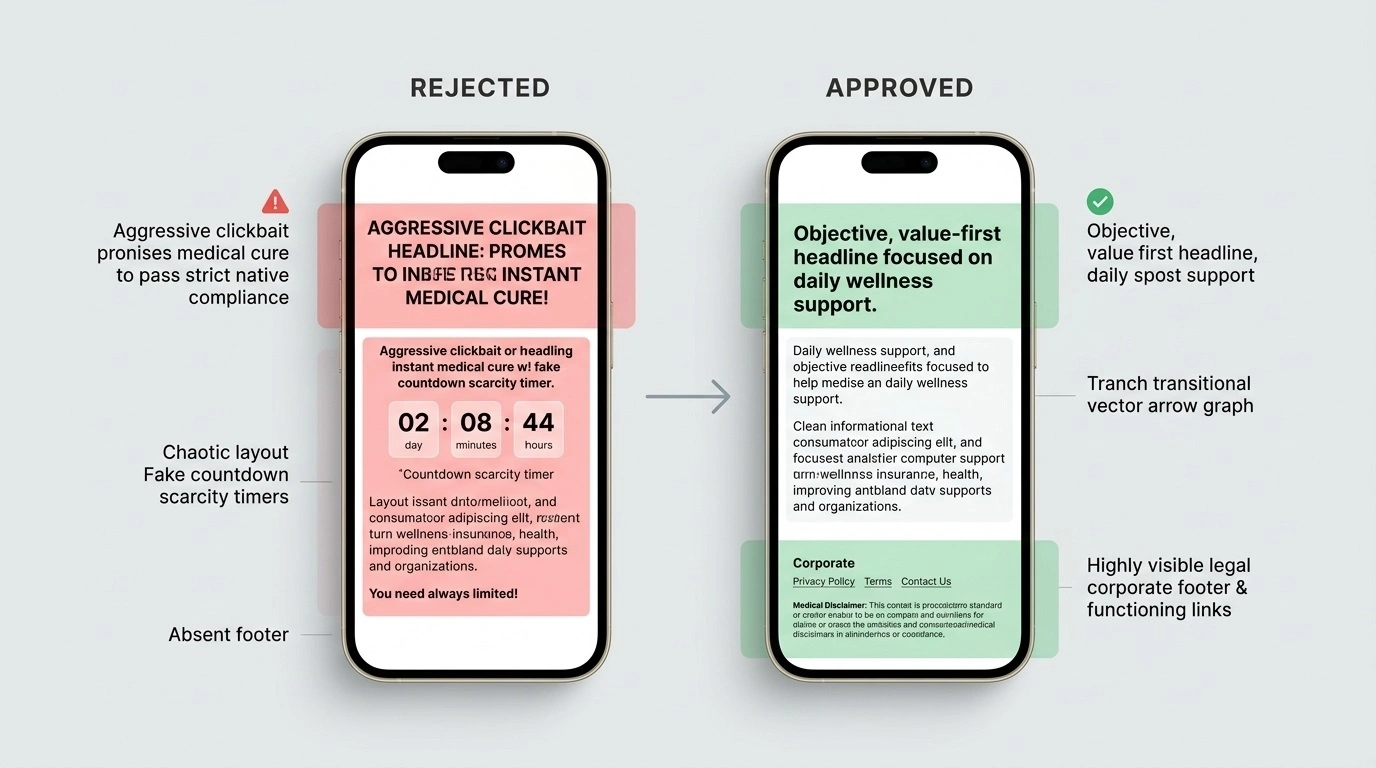
1. Misleading claims, urgency, or social proof
Check whether the page uses claims that a reasonable reader could interpret as deceptive or unsupported. Examples include:
- Countdowns or “limited time” messages that do not reflect a real deadline.
- Stock or availability claims that cannot be substantiated.
- Testimonials, reviews, expert endorsements, or media mentions that are invented or presented inaccurately.
- Before-and-after imagery or dramatic health, appearance, or financial claims that misrepresent likely outcomes.
How to fix it: Remove unsupported claims, verify any evidence you retain, and explain material limitations clearly. A disclaimer does not make a misleading claim acceptable by itself.
2. A mismatch between the ad and the destination
Compare the ad creative with the landing page. The destination should deliver what the ad leads people to expect, identify the offer accurately, and avoid introducing a materially different claim after the click.
How to fix it: Align the ad headline, landing-page headline, offer details, pricing, and next step. Do not use a promise in the ad that the page cannot substantiate.
3. Disclosures and business information
Visitors should be able to understand who is responsible for the page, what is being promoted, and how their information may be handled. Exact legal and disclosure obligations depend on the business, offer, audience, and applicable jurisdictions; do not assume one generic footer satisfies every requirement.
- Make relevant privacy information easy to find, especially if the page collects personal data.
- Use clear advertising or sponsored-content disclosures where required and appropriate.
- Provide accurate business or contact details where required.
- For health, financial, or other sensitive claims, verify applicable platform rules and legal requirements before launch.
How to fix it: Check current policy and legal requirements for your offer and market. Add accurate information and test footer links. Do not rely on a blanket disclaimer to make a claim acceptable.
4. Restricted content or offer-specific requirements
Some offers and content categories receive additional scrutiny or may be restricted. Do not assume that changing a campaign setting makes otherwise disallowed content acceptable.
How to fix it: Check current rules for the product, claims, creative, destination, and target geography. If the offer is not permitted, do not resubmit it unchanged.
5. Technical or destination problems
Open the final URL in a private browser window and test it on desktop and mobile. Check for broken links, unavailable pages, redirect loops, blocked content, intrusive overlays, and differences between the submitted URL and the page users actually see.
Use PageSpeed Insights to identify performance opportunities. This guide does not claim a universal page-weight or load-time number guarantees approval; verify any explicit technical requirement in current platform guidance.
A template, disclosure, design, or professional review cannot guarantee approval. The platform reviews the specific ad, offer, destination, and campaign against its current policies.
How to audit a rejected Taboola landing page
- Save the rejection notice. Record the exact wording, campaign, creative, and destination URL.
- Reproduce the visitor experience. Open the submitted URL on desktop and mobile, including the final destination after redirects.
- Inspect the relevant elements. Review the headline, imagery, testimonials, offer terms, pricing, disclosures, and potentially restricted content.
- Check the current official policy. Use Taboola's policy documentation rather than treating third-party checklists as definitive.
- Make focused changes. Correct the identified issue and other clear problems; document what changed.
- Test the complete page. Verify links, forms, mobile layout, redirects, and consistency between the ad and destination.
- Resubmit or ask for clarification. Follow the workflow shown in your account. If the reason remains unclear, contact support with the campaign details and changes made.
Headline examples: make the promise match the page
A headline is not compliant simply because it sounds restrained. It should accurately describe the content and be supported by what the page provides.
| Risky approach | More transparent approach | What to verify |
|---|---|---|
| “Doctors are speechless about this miracle” | “What current evidence says about [specific topic]” | That the article accurately represents evidence and does not imply unsupported medical outcomes. |
| “This secret trick fixes your credit score” | “Factors that can affect a credit score” | That the page explains the factors accurately and does not promise a particular result. |
| “Only minutes left to claim your deal” | State the actual offer and deadline, if one genuinely exists | That the deadline and terms are real, current, and visible. |
These are illustrative examples, not guaranteed-approved headlines. Review the actual offer and applicable rules before publishing.
Pre-submission checklist
- Every material claim is supportable and not misleading.
- Testimonials, endorsements, images, and media references are genuine and used accurately.
- The ad and landing page describe the same offer without a misleading change in promise.
- Relevant disclosures, privacy information, and business details are accurate and accessible.
- The product, claims, creative, and destination have been checked against current policy requirements.
- The page works on mobile and desktop; forms, links, and redirects have been tested.
- The final URL opens the intended content and does not depend on broken resources.
- The rejection notice and changes are documented before resubmission.
Should you hire someone to review the page?
A qualified copywriter or developer may help identify unclear claims, improve page structure, test the mobile experience, and fix technical issues. Ask them to explain the changes and the policy references behind them. No service provider can honestly promise approval or guarantee that an account will remain in good standing.
If you need help with page structure and implementation, request a custom advertorial build on Fiverr. Treat the service as production and review support—not a promise of platform approval.
FAQ: Taboola landing page rejection
The bottom line
When Taboola rejects a landing page, avoid guessing or rebuilding everything immediately. Use the notice as your starting point, verify the current policy, correct the actual issue, and test the complete visitor experience before resubmitting.
Keep claims supportable, disclosures clear, and the ad promise consistent with the destination. These steps improve submission quality, but they do not guarantee approval.